
Last updated on July 17, 2026
Did you know there’s a Nendoroid Face Maker website where you can design your own Nendoroid faces? You can create and purchase your own customized face plates for the Nendoroid bodies you already own!
Update 2026: Nendoroid Face Maker is now available in English and offers direct international shipping to a number of supported countries. However, you can also send your custom face plates to DEJAPAN if you want to combine them with other purchases from Japan and ship everything together.
In this guide, we’ll show you how to:
- Design your very own custom Nendoroid faces
- Place an order and ship to DEJAPAN’s Warehouse address
- Submit your order through DEJAPAN’s Request Form so you can combine your Nendoroid faces with your other DEJAPAN orders
Table of Contents
Step 1: Create a Nendoroid Face Maker Account
**If you want to combine your Nendoroid faces with your other DEJAPAN orders, you can send your Nendoroid face designs to the DEJAPAN Warehouse address.
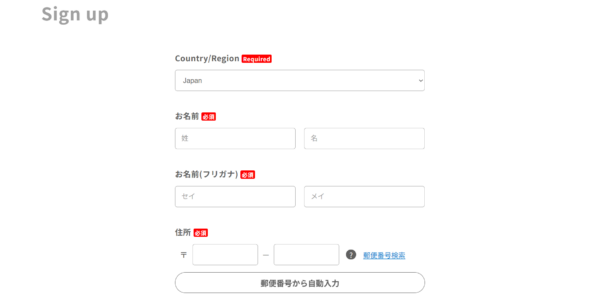
(Address fields are only written in English for non-Japanese addresses)
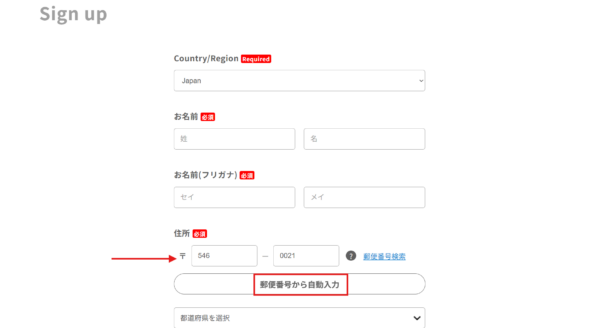
First, enter the following postal code in the boxes next to the 〒 symbol.
・546 – 0021
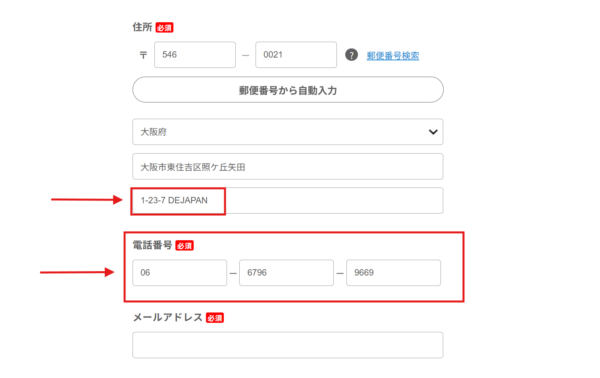
Then, hit the button underneath to automatically fill the other address fields in. The prefecture name should pop up with “大阪府” in the dropdown menu, and the city and neighborhood information, “東住吉区照ケ丘矢田” will appear in the box below.
The third box on the bottom will still be blank, though. Here, type in the street address, “1-23-7 DEJAPAN” (including the dashes) to complete the address.
For the phone number, use: 06-6796-9669. If anyone calls us, we’ll email you.
DEJAPAN Note:
Please note that other than Nendoroid Face Maker orders, we do not accept any items ordered directly by the customer at our Warehouse.
**DO NOT use our Warehouse address on any site except for the Nendoroid Face Maker!
For more information, please check our announcement.
(When it comes to arranging and paying for international shipping from us to you, see the end of Step 4.)
Anything with the red 必須 kanji next to it is a required field. You have to fill those in. All the fields are, in order:
- Country/Region
- Name (Last Name, First Name)
- Name in Japanese kana (Last Name, First Name) → Use this quick kana generator!
- Address
- Phone number
- Email address (enter only once)
- Password (enter only once)
- Click check box underneath if you want to view your password
- Do you want to receive the email newsletter?
- Top option for YES (受け取る)
- Bottom option for NO (受け取らない)
Once all these fields are filled in, hit the green button at the bottom to agree and send the authentication email. This will lead you to the confirmation page. Click “Sign Up” at the bottom to complete the process.
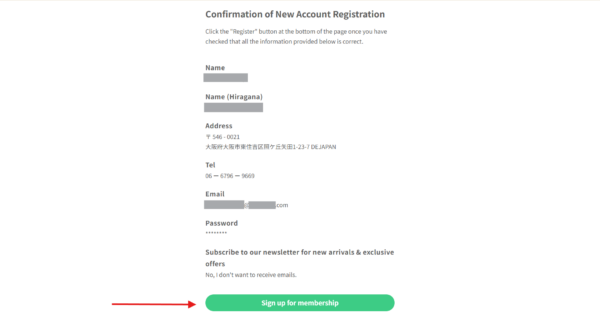
Finally, check your registered email address to confirm your registration and get started on your Nendoroid design journey!
Step 2: Start Making Faces
Now you can get started making your own customized faces! You can make 2 face plates at a time with the Nendoroid Face Maker. The cost of one set is 1,400 JPY (including tax), even if one or both of the faces are blank.
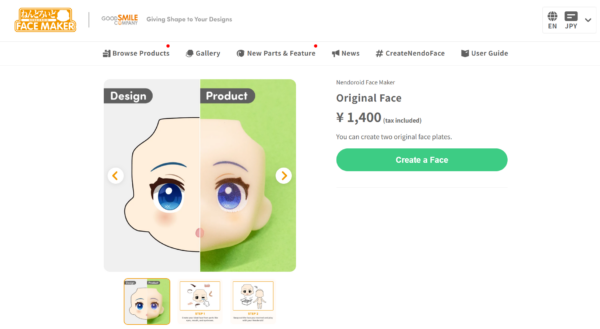
First off, you’re going to be met with a blank face. Choose your preferred skin color, and get designing! With 7 categories and several sub-categories within each one, the possibilities are endless.
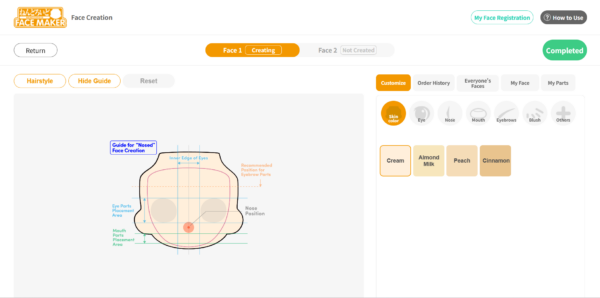
To be specific, there are up to 19 different face parts/accents you can add to your Nendoroid face, including (but not limited to):
- Eyes: Shape
- Eyes: Eyelids
- Eyes: Pupils
- Eyes: Iris 1
- Eyes: Iris 2
- Nose
- Mouth
- Eyebrows
- Blush
- Others: Paint 1 and 2
- Other: Beard
- Other: Mole 1-3
- Other: Scar 1 and 2
- Other: Wrinkle 1 and 2
Each page gives a preview of each option design. Use the direction arrows to move the parts’ position on the face, the plus and minus signs to adjust the sizes, and the circle arrows to rotate. The “Remove” button on the right deletes whatever you just placed.
If you’re making 2 original custom faces, don’t forget to switch to the second one when the first one is done. Once you finish Face 1, click the green “Complete” button to move to Face 2.
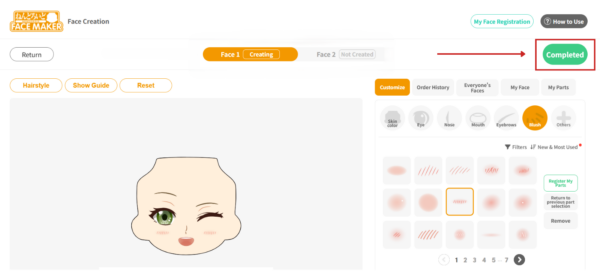
**Pro Tip!
Save your face after you hit “Complete” so you can use it again another time! It’s great when you want to have a consistent base for a particular character.
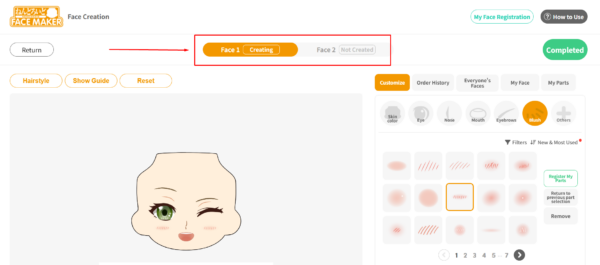
You can see which face you’re working on by checking which face option is highlighted yellow near the top of the page.
**Check out Nendoroid’s official Face Maker User Guide for a more detailed breakdown of their Face Maker designer.
Custom Options and Colors
The Nendoroid Face Maker gives you the freedom to create whatever kind of face you can think of. The customization choices are intense. You can choose the shading of your eyes, add heart-shaped light reflections on the eyes, and select all kinds of different facial features and accents! You can even decide whether to design each eye individually. Heterochromia Nendo? Completely up to you!
Standard vs. Individual Mode for Eyes
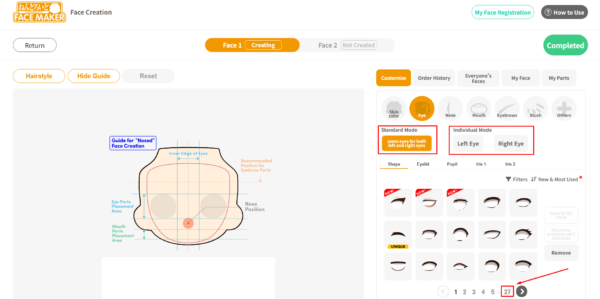
If you’d like to add a little edge or uniqueness to your character, you can create different designs for each eye! Just select which eye you want to work on under the “Individual Mode” header (see the image below).
The default option is “Standard Mode,” where both eyes have the same design.
With so many options to choose from, settling on an eye shape, color, and other facial features can take time. Possibly even hours if you’re a perfectionist and want to get the placements just right.
Perhaps you’ve already made faces in the past. If you check out the “Order History” tab, you can see and re-order any Nendoroid face you’ve designed previously.
Or maybe you don’t really have a design in mind, or the number of options is too overwhelming. In that case, you can click on the “Everyone’s Faces” tab to see a collection of faces that other people have created. Sometimes it’s easier to just order a face that someone else made. (And hey, some of them are pretty cool!)
Depending on the season, Nendoroid will release special limited-time facial features and parts. Be sure to keep an eye out for news and updates about these seasonal parts on GoodSmile’s Face Maker website and social media.
**IMPORTANT**
Please take screenshots of your finished faces! We’ll need them to match your order to your info.
Step 3: Checkout
The best thing about the Nendoroid Face Maker is that it’s not just a fun design platform. The whole point is to get these custom faces and use them on your own Nendoroid figures! Once you finish Face 2, click the green “Completed” button at the top-right. Then, click the green “Proceed to Confirmation” button to confirm your designs before checkout.
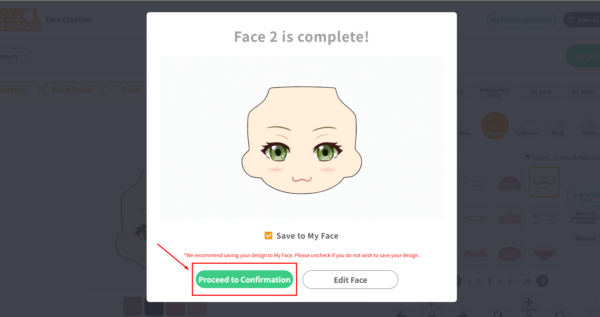
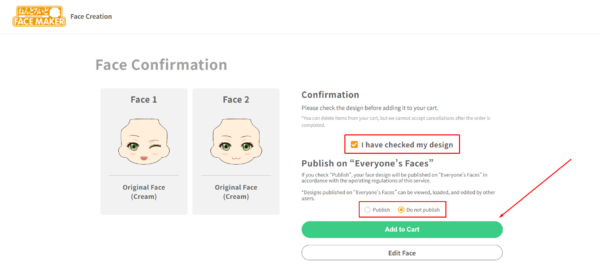
This may sound obvious, but when confirming your designs, don’t forget to check the “I have checked my design” checkbox. If you don’t, you won’t be able to add your faces to your cart.
Also be careful to select whether your want your face plate designs published on “Everyone’s Faces.” If you select “publish,” your designs will be available for any other user to see, load, and edit. (Maybe not a good idea if you designed an OC.) If you don’t want to share your designs, be sure you select “Do not publish” adding to your cart.
Checkout works as it does on most other websites. Check the number of items in your cart, confirm the total (tax included), and if everything looks correct, click “Proceed to Checkout.”
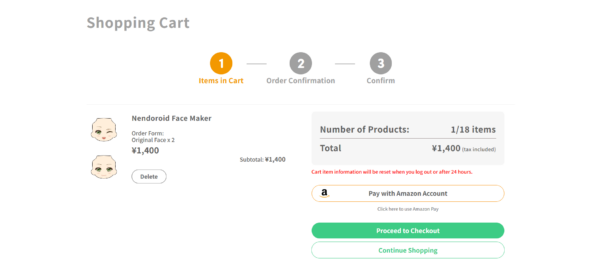
You can pay for your order via credit card (via Stripe) or PayPal. You can also checkout using an Amazon Japan account (if you have one).
However, if you decide to ship your order to DEJAPAN’s Warehouse to combine with your other orders, you may have trouble using foreign credit cards. In that case, we recommend paying with PayPal.
**Convenience store payment is also available for those located in Japan.
Confirm your shipping information, enter your payment details if necessary, and you’re good to go! You should receive a confirmation email once this your order is placed.
DEJAPAN Heads-Up:
Custom Nendoroid faces are made-to-order, so they can take up to 14 working days to arrive at our Warehouse.
Once we receive your Face Maker order, we can combine your faces with your other orders and ship them to you, wherever you are!
You’re also going to need a DEJAPAN account for a smooth delivery to our Warehouse, so make sure you’re registered on our website.
Step 4: Send DEJAPAN Your Order
Now that you’ve submitted your order with Nendoroid Face Maker, you’ll need to submit the order to us so that we know it’s coming. If you don’t complete this step, we won’t have any way of knowing which faces belong to who. If we are unable to determine the ownership of the Nendoroid face plates, they may be discarded.
To submit your order, head to our Request Form, and enter the URL for the face maker site (https://nendoroidfacemaker.com/) into the Item URL field. Then click “Next.“
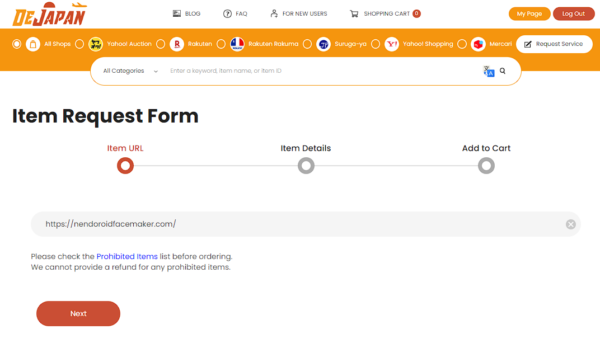
On the next screen, you’ll need to edit the Item Name and Item Image fields.
For the Item Name, enter “Nendoroid Faces (0000000)”, and make sure to replace the zeros with your Face Maker order number.
For the Item Image, delete the auto-filled image and upload a screenshot of the faces you ordered. This helps our Warehouse Team make sure that the correct faces arrived.
**IMPORTANT**
Leave the Item Price field as 0 JPY, since you’ve already paid on the Face Maker site.
If you make a payment at this stage, we’ll have to cancel the order and have you resubmit your order.
Here’s how your order form should look:
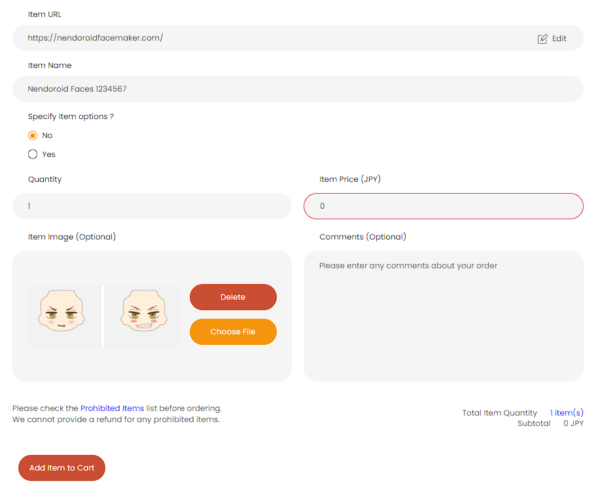
Finally, click “Add Item to Cart.” If you have more than one order, repeat this process. Once you’ve added all of your orders to your cart, proceed through DEJAPAN’s checkout.
Step 5: Have Fun with Your New Creations
Once you receive your customized faces, go ahead and start sticking them onto any Nendoroid you like! Maybe you made a face with a specific character in mind. Or maybe it’s a design that works on any Nendoroid doll. In any case, have fun detaching and re-attaching your new faces!
If you need any inspiration, we cover face-swapping a little bit in our blog post about Nendoroids.
Make a (^_^) Face, Not a (T_T) Face
Go ahead and give the Nendoroid Face Maker a try!
Be sure to check out our other Nendoroid-related posts while you’re at it!

If you have any questions about shopping from Japan or about a specific item, feel free to contact us.
We’re happy to help!
At DEJAPAN, our Customer Service team with native English speakers is available to assist with any problems or answer questions.


What a fantastic service you are providing! Thank you so much for this! I’ve always heard of this maker service but I was told it was for Japanese residents only.
Thank you so much for your kind words!
It is usually only available to Japanese residents, but we want to help people anywhere in the world get these items!
Please feel free to place an order if there’s anything you’d like.
Sorry, im having some issues with email:( i can’t find your email to sign up
Hi Margoth,
Thanks for the comment!
If you are wondering how to sign up for DEJAPAN, you can sign up through this link here. https://www.dejapan.com/en/signup
If you are still having difficulty, please feel free to send us a message here. https://www.dejapan.com/en/page/contact-us
We hope to hear back from you soon.
Hi. Im having issues with the phone number. It says it have to be within 5 characters
Hi Saulo,
Thanks for the comment!
Could you please email us at contact@dejapan.com with a screenshot of that error if you’re still having the same issue?
We’re happy to look into this!
i have silly question, how it take long time for Nendoroid arrive after i order in 2024/11/19. everything i follow is perfect. SOOO….id know when and time. thank for ask.
Hi Israel,
Thanks for the comment!
According to the Nendoroid website, shipping can take up to 14 days after they send the order confirmation email.
So, it might take around 3–4 weeks for our warehouse team to mark your item(s) as arrived.
Please feel free to email us at contact@dejapan.com if you have any further questions!
Hello,
I just purchase the nendoroid faces and I am a bit confused. Do I need to fill out the request form after I just paid? And how do I send the screenshot to you? Thank you.
Hi Mori,
Thanks for the comment!
Once you have purchased the Nendroid Faces, please place an order through our request form. On the form there will be a field for you to upload an image, please upload your screenshot there.
Please feel free to email us at contact@dejapan.com if you have any further questions!
Hello, I wonder if you might want to update your guide, because the website is pretty different now, it took me a while to figure out… basically once you finish editing one face, you have to go to your “order history” button and confirm that you want that face, and then it lets you move onto face 2. You have to go to the order history again, confirm that face, and then it lets you go to check out. This is probably intuitive if you can read Japanese, but because I can’t, I spent a long time trying to figure out why I kept adding faces to “My Faces” instead of the cart lol
Anyway thank you so much for being a resource for this!!!! If we ordered like 8 faces, would you be able to combine shipping costs?
Hi Mebe,
Thanks for the comment!
We will review the blog post and hopefully update it to match the current Facemaker Site.
Once all the faces have arrived at our Warehouse, feel free to consolidate them all into the same parcel and we will ship them to you together.
Hello, do you still offer this proxy ordering service for custom Nendoroid faceplates?
Hi Music,
Thanks for the comment!
We do still process orders for Nendroid Facemaker! Feel free to follow the instructions on the blog to put in an order!
Let us know if you have any questions!
Hello~ Just checking, do you still offer this proxy ordering service for custom Nendoroid faceplates?
I just wanted to ask if there are multiple skin tones available?
Is there only a white skin tone available or can you choose a cinnamon one?
Hi, I’m gonna review nendo face making and shipping service from dejapan
I’m waiting for 3 weeks, include the company produce your nendo face. I used double packing option and EMS shipping and it arrived safely. It’s kinda quick for me since it have a covid-19 situtation.
Here my nendo face pic for example. Hope it useful for you guys 🙂
https://www.picz.in.th/image/2T1I1Z
I would love to ask some questions, for people who has tried this metod to get the faces.
-What country are you from?
-How much cost the shipping to your country?
-Was it difficult to understand anything?
-Did you used your real name, or a katakana name to register?
-Is it still available this metod?
May I ask whether you have a fee calculator so I can calculate the fee needed for the international shipping from japan to my address(not US) ><
Thanks!
Sure you can ask! And sure we do have a calculator – https://www.dejapan.com/en/top/cart/asp/estimate.asp
Спасибо за информацию!!!!!
Thank you for the helpful guide! I just successfully ordered 2 faceplates for my nendoroids and I’m very excited for them ^^
Where can we find the order number?
It should be in the confirmation email you get from the NFM website when you’ve bought the faces. 🙂
Hello, thank you so much for this !
I would like to know if it was possible to ask the face with the nose done? I don’t really know how to explain it but in official Nendoroid, some of them got the nose in relief?
Hi! We know what you mean 🙂 The Face Maker faces don’t have a relief nose option, as far as we know. You can pick a design nose, but it’ll be printed on like the other parts. Let’s hope they add one!
How will you contact us if they call?
As above: “If anyone calls us, we’ll email you.” 🙂 You need a DEJAPAN account to finish the order, so we’ll have your contact info that way.
Hi, I’m writing this to ease any lurkers who feel worried about using dejapan + face maker!!
Last month, I used this guide in order to make two face plates for a custom nendo I’m working on. After waiting for 3-4 weeks, the faces came in fantastic quality.
Here are some images I took of the faces + and a comparison of the skintone compared to a regular white skintone.
https://i.imgur.com/IL4uLEX.png
https://i.imgur.com/AOOpidL.png
I hope this is useful for you guys!!
Thanks for the comment, these are great pics of the finished faces. 😀
Hello!
I’m thinking about doing this but Ibwas wondering what to write in the name and surname sections when I register 🙂 thanks!
For the Face Maker site’s name boxes, you might wanna turn your name into katakana here: https://www.sljfaq.org/cgi/e2k.cgi
The process was fun and simple! I’m super excited to receive my nendoroid faces! If the process goes well I will be buying so much more from you guys!! 😀
Thank you so very much for this guide, it was super helpful and I just used it to make a purchase, so all I gotta do now is wait for it to arrive to your warehouse and then contact you from there to ship it to me in the USA :3
If this all goes well, then I will be making more purchases in the future :3
I am thinking of doing this myself so I’m wondering how everything worked out for you?
Yeah, if you’re reading this and you’ve tried out the Face Maker, let us know how it went! 🙂